

In-patient claims (ECLIPSE)
You lodge an in-patient medical claim for the medical services a practitioner gives a patient admitted to a hospital. Medicare assesses the claim. For every claim type except Medicare Only, Medicare then sends the claim to the patient’s health fund. Your software retrieves the outcome as a report, and the record of the payment as a remittance advice.
Services Australia carries these claims through its Electronic Claim Lodgement and Information Processing Service Environment (ECLIPSE). Practice software often calls this ECLIPSE claiming.
Test environment only. Services Australia is certifying this service, and it reaches production once certified.
Acknowledged
Medicare accepts the claim for processing. The acknowledgement carries no assessment.
Reported
The claim’s report gives Medicare’s assessment, and the health fund’s where the claim type has one.
Paid
The remittance advice gives the deposit amount and the benefit paid for each claim.
A Patient Claim follows steps 1 and 2 only. Patient Claims describes its outcome.
Which claim type do I send?
The claim type decides who pays whom. Set it in claimTypeCode.
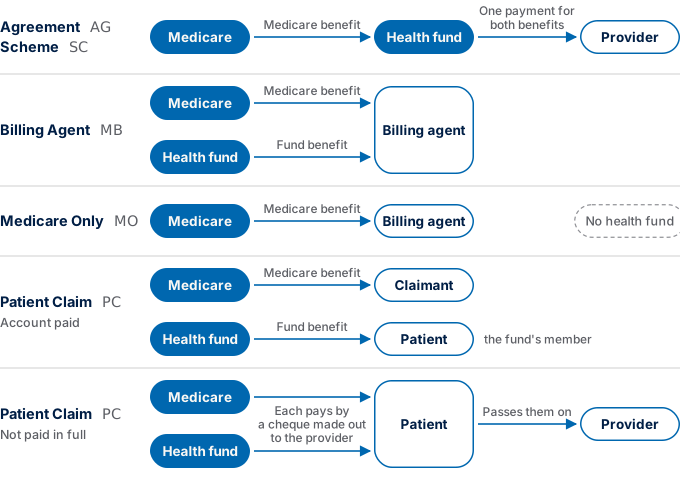
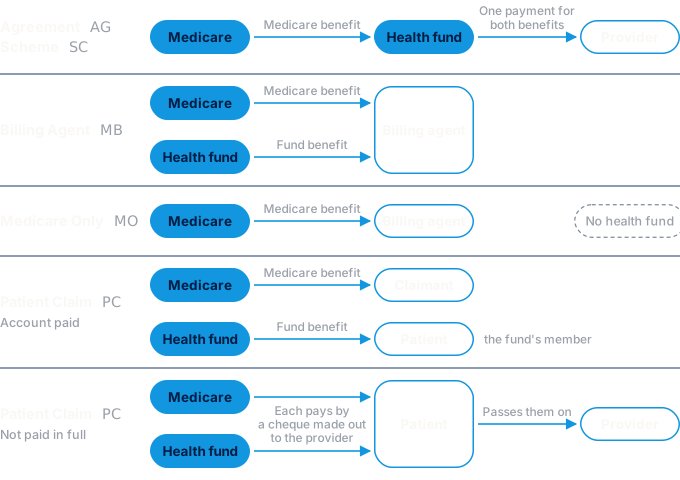
What each claim type sends
These fields change with the claim type. A Patient Claim sends its own set, listed in Patient Claims.
Each claim type’s endpoint pages give every field’s meaning, format and values.
Assignment of benefit
In every claim type except Patient Claim, the patient’s Medicare benefit is assigned to the health fund or the billing agent. benefitAssignmentAuthorisedInd declares which pathway applies, and that its legislative requirements are met. For a claim with a service given before 1 July 2026, send I.
Digital requests, notices and questions
- Digital requests. Services Australia notes that your software may collect a requested assignment digitally.
- Notifying the patient. The health fund or billing agent that receives the Medicare benefit notifies the patient within 6 months of receiving it. It keeps its records of the assignment or the notice for 7 years. Services Australia’s specification sets this rule beside implied assignment, and does not say whether it also applies to requested assignment.
- Questions. Send questions about these rules to AssignmentofBenefit@health.gov.au.
Specialties
Each claim type has a general, a specialist and a pathology endpoint. Send each claim to the endpoint for its services, and set serviceTypeCode to match.
- The wrong endpoint. Medicare rejects a claim with
2030when itsclaimTypeCodeorserviceTypeCodedoes not match the endpoint it was sent to. - Referral fields. Each specialist and pathology endpoint’s page sets out the referral, request, override and self-deemed fields it takes.
- Keep the referral. Services Australia requires your software to keep a patient’s referral details for use at a later consultation.
- Group attendances. In every claim type except Patient Claim, send an item for a group attendance or a home, hospital or institution visit through the general endpoint, with
numberOfPatientsSeenset. A specialist endpoint assesses the item with no benefit and explanation code402.
Validations
Patient Claims
A Patient Claim (PC) has rules of its own:
- Declaration and consent. Before you lodge, present the Patient Claim consent and declaration to the patient, on screen or printed, and get their verbal consent. Services Australia publishes the current declaration, with its privacy notice, on its Health Systems Developer Portal. Services Australia advises that legislation requires the current version.
- Lodging later. Services Australia requires your software to be able to create the account now and lodge the claim on a later date.
- Outcome. Medicare sends the assessment to the patient. The claim’s report gives its status only.
A Patient Claim sends these fields where they differ from the other claim types:
Before the first claim
Get the current fund list
Send Get Participants before your first claim, and keep the list current as Fund codes sets out. A claim names the patient’s health fund by its fund code from that list.
Verify the patient
Check the patient’s Medicare details, and their health fund details where the claim type has a fund, as Patient verification sets out. Where Medicare returns different details, offer the user an update to the patient’s record.
Check eligibility
Check eligibility before you lodge, so the patient can give informed financial consent.
- To estimate Medicare’s benefit for each service, send Eligibility Check with
InHospitalTreatmentset totrue. - To estimate what the patient’s health fund pays under their cover, send a health fund eligibility check.
Lodge a claim
Create the correlation ID
Create a correlationId for the claim, and store it with the claim before you send it. You need it to follow the claim to its report and its payment. Correlation ID gives the format.
Follow the claim to its outcome
The assessment takes place after the acknowledgement. Your software follows the claim with a status request, then retrieves the report once the status says it is ready. The remittance advice follows the same pattern, once the claim is paid.
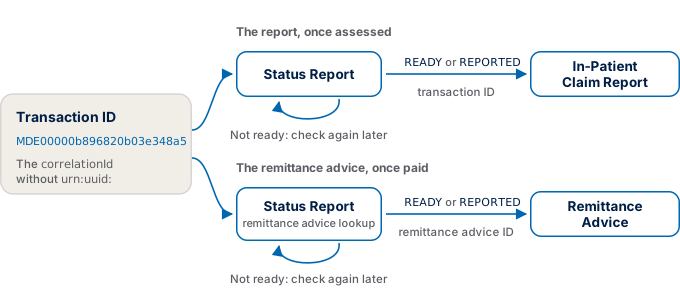
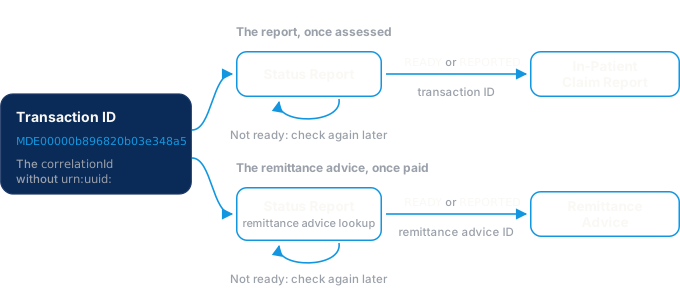
- Transaction ID. A claim’s transaction ID is its
correlationIdwithout theurn:uuid:prefix, such asMDE00000b896820b03e348a5. Every status request and report request names the claim by it. A remittance advice has its own ID, the remittance advice ID, which a status request returns. - Same Minor ID. Send every request with the
x-minor-idthat lodged the claim. - For 6 months. For 6 months from lodgement, you may check a claim’s status and retrieve its report and remittance advice as many times as you need.
Request the status
Send the claim’s transaction ID to Status Report, or send a range of lodgement dates to list your claims.
Read the status
Each claim’s row gives a reportStatus and a processStatus. Status Report explains each value.
Services Australia asks that you retrieve a report only once its status is READY or REPORTED. Your software may send both requests automatically.
Retrieve the report
Send the transaction IDs of claims whose report is ready to In-Patient Claim Report. An entry with a status of SUCCESS carries the claim’s report.
Services Australia requires your software to be able to retrieve an available report more than once.
Read the report
The report gives Medicare’s assessment of each service, then the health fund’s. Show each status.text and each explanation’s text to the user exactly as returned. Where Medicare returns different details in medicareAssessment.currentPatient, offer the user an update to the patient’s record. In-Patient Claim Report describes every field, and the claims whose report has no health fund assessment.
Reconcile payments
A remittance advice records a payment for in-patient claims: the amount deposited, the reference on the bank statement, and the benefit paid for each claim. Services Australia calls it an ECLIPSE Remittance Advice.
Request the remittance advice status
Once the claim’s processStatus is COMPLETE, send its transaction ID to Status Report, with requestTransmissionType set to mcp-eclipse-remittance-advice.
Read each row
When a row’s reportStatus is READY or REPORTED, its transactionId is the remittance advice ID. Store it. A Billing Agent claim returns a transaction ID for each of its 2 remittance advices once each is ready. Status Report explains each reportStatus.
Retrieve the remittance advice
Send the remittance advice’s transaction ID to Remittance Advice. That page also says when a remittance advice is ready.
Record the request
Store the date of your last successful remittance advice status request, as Services Australia requires. Show the user that request’s details, including its toDateTime.
Match the payment
Match the remittance advice to your bank statement by its paymentInfo.paymentReference and paymentInfo.depositAmount. Then match each claimSummary entry to your claim by its accountReferenceId. Remittance Advice describes every field.
In the test environment
- Assessed claims. Claiming in the test environment says how the test environment handles in-patient claims.
- Test data. Use the fund code, facility ID and billing agent in Hospital, fund, and billing IDs, with the Medicare test patients and providers on the same page.
What Services Australia requires
Each rule Services Australia sets for in-patient claims appears at the step it applies to. What Services Australia requires of your software lists the rules that apply across every step.